At a glance
- Customers don't download the app again when the new version ships as an update under the same Bundle ID (iOS) and package name (Android), from developer accounts the brand controls.
- Some assets break even when the listing survives: keychain-based logins, push credentials, the Apple Pay merchant ID and any Firebase Dynamic Links, which shut down on August 25, 2025.
- Push subscribers are the hardest users to replace: Airship's 2026 benchmarks put median opt-in at 48.85% on iOS and 53.3% on Android.
- The safest sequence puts ownership before code, releases the app as an update and tracks continuity for 90 days.
For most ecommerce brands, the app is the most loyal corner of the business. The customers who installed it buy often, open your messages and forgive the occasional bug. So when a brand decides to change app provider, the real worry isn't the new features. It's whether those customers will still be there the morning after the switch.
Usually they will. An ecommerce app migration without losing users depends far less on the new code than on something most teams never look at: who owns the app's place in the App Store and Google Play, and the handful of keys that keep customers logged in and subscribed. With ownership settled, customers simply see an update. Without it, you're asking your best customers to start again.
Will Shoppers Need to Re-Download the App After a Provider Change?
The first question has the clearest answer. Shoppers don't need to download the app again when the new version is published as an update to the existing listing, under the same Bundle ID on iOS and package name on Android, from developer accounts the brand controls. They do when the new app goes live as a separate listing.
An ecommerce app migration means moving a live shopping app to a new codebase or provider while it keeps its store listing, installed customers and data. The stores recognize "the same app" by its identifier, not by who wrote the code. Apple's App Store Connect documentation confirms that an app moved between developer accounts stays available, keeps its reviews and ratings and keeps updating for existing users, and that its Bundle ID can't change once a build is uploaded. Google Play's transfer rules likewise move users, ratings, reviews and the listing with the app.
A separate listing, by contrast, turns your installed base into an acquisition campaign. AppsFlyer's App uninstall report 2025 puts the average 30-day Android uninstall rate at 46.1% in 2024, a reminder of how little patience shoppers have for friction.
If the previous provider published the app from its own developer accounts, it has to be transferred to the brand's accounts first, which needs the old provider's cooperation and belongs in the exit plan. The FAQ below covers how Apple and Google handle it.
The listing solves the biggest problem, but not every asset travels with it.
What Carries Over in an App Migration and What Breaks
Once the listing is secure, installs, ratings and the update channel carry over automatically. Assets tied to keys, credentials and third-party services break quietly unless someone owns moving them. Five assets decide whether users stay: the listing, logins, push subscribers, deep links, and reporting and payment setup. Logins and push get their own sections below; this map covers the other three.

Store listing, ratings and installs
The listing decides everything else: it carries over cleanly when identifiers stay the same, while a new listing gives up installs and ratings at once.
In short.
- Carries over when: The new build ships under the existing Bundle ID and package name.
- Breaks if: The app is republished as a new listing.
- Who must own it: The brand should, through its own developer accounts.
- Act before: This is settled before signing with the new partner.
Deep links
Deep links send a tap from an email, ad or push to a product page, and some may already be broken. The Firebase Dynamic Links deprecation FAQ confirms the service shut down on August 25, 2025, and its links now return an HTTP 404 error. Google recommends Universal Links on iOS and App Links on Android instead.
In short.
- Carries over when: Links use Universal Links and App Links on a domain the brand controls.
- Breaks if: Links depend on Firebase Dynamic Links or the previous provider's domain.
- Who must own it: The brand should, through its own domain.
- Act before: This is fixed before any campaign links into the new app.
Store reports, analytics and payment setup
These move only partly. Apple passes on App Analytics history but only post-transfer sales reports; Google Play keeps bulk export, payout and earnings reports behind, and Firebase and Google Analytics must be relinked. Apple Pay's merchant ID doesn't transfer, so the next update needs a new one.
In short.
- Carries over when: The app moves between Apple accounts, which brings App Analytics history.
- Breaks if: Google Play reports aren't downloaded or integrations aren't relinked.
- Who must own it: The brand's ecommerce and finance teams should.
- Act before: This is done before the transfer date.
The two assets that touch every customer directly, logins and push subscribers, need a closer look.
Keeping Customers Logged In Through the Switch
Customer accounts survive a migration because they live on the commerce platform, not in the app. What's at risk is the session, the login token stored on the phone, which some setups lose when the app changes owner.
When the app signs customers in against the store's own accounts, the account is untouched. PassaSports, a JMango360 client, shows the principle. The retailer specializes in nine sports, and because customers were buying across separate sport-specific shops, it merged nine sports sites into one shop. In the app JMango360 built, customers log in with their existing account whether they shop on the webshop or in the app. When identity lives with the store, the app can change while the account stays put.
The session differs. Apple's transfer documentation explains that keychain sharing works only until the app is updated, after which users must log in once because the stored token can't be retrieved. Apps offering Sign in with Apple need a transfer identifier generated for each user beforehand. Announced, a re-login is a minor step; unannounced, it looks like a fault and surfaces in support tickets and reviews.
A useful early check is where the login token is stored: a keychain group tied to the previous team makes a single re-login likely, and loyalty balances or wishlists held only in the app's own backend need exporting deliberately.
Logins can be recovered with one prompt; push subscribers can't.
Push Subscribers Are the Hardest Users to Win Back
Push permission is granted on the device, to a specific app, making it the most fragile asset in a migration. When the app keeps its identifier and the push credentials move to the new owner, subscribers stay subscribed. When they don't, every customer has to be asked again, and for the median iOS app fewer than half say yes.
Airship's Mobile App Push Notification Benchmarks for 2026, based on 2025 data across 15 verticals, put median opt-in at 48.85% on iOS and 53.3% on Android, and note that Android no longer opts users in by default since Android 13. Retail sits at the low end: the weakest 10% of retail apps on iOS reach only 18.1%.
What carries subscribers through is the credentials, not the code. Apple states that existing APNs certificates stay valid until they expire, after which the new owner generates its own, and that token-based setups need a key from the new team plus updated push servers. Google requires Firebase projects to be relinked to the new Play Console account. Services such as OneSignal or Firebase Cloud Messaging send through those credentials, so the keys matter more than the code.
Vlisco, a JMango360 client, shows what's at stake. The Dutch wax-print fabric maker, founded in 1846, wanted a direct line to its large fan base to make buying again easy. JMango360 built a native app with deep out-of-the-box integrations with Magento 2 and Google Analytics 4, and Vlisco reports push opt-in of about 50%. That is the subscriber base a careless migration resets to zero.
Sequencing an App Migration So the App Never Goes Dark
With every asset mapped, the remaining question is order, and the safest one puts ownership before code. Accounts and credentials are secured first, the app is built and tested under the existing identifiers, and it's released as an update while the old version keeps serving customers.
- Accounts and identifiers come first, because every later step assumes the new partner can publish under the existing identifiers. Google reviews transfer requests within 2 business days; Apple needs two Account Holders acting in turn.
- A credential inventory follows. Push keys, the Play App Signing upload key, Firebase projects, the Apple Pay merchant ID and the deep-link domain each need a named owner, because unowned items fail on launch day.
- Testing is timed around the transfer. Google Play test groups can't be transferred, and Apple asks for TestFlight testing to be switched off before a transfer starts.
- Scope is phased, not users. PassaSports launched its app with two sports and integrated all its labels within a few months. A stable core release, with features added in later updates, limits what can go wrong on day one.
Launch Day and the First 90 Days After the Switch
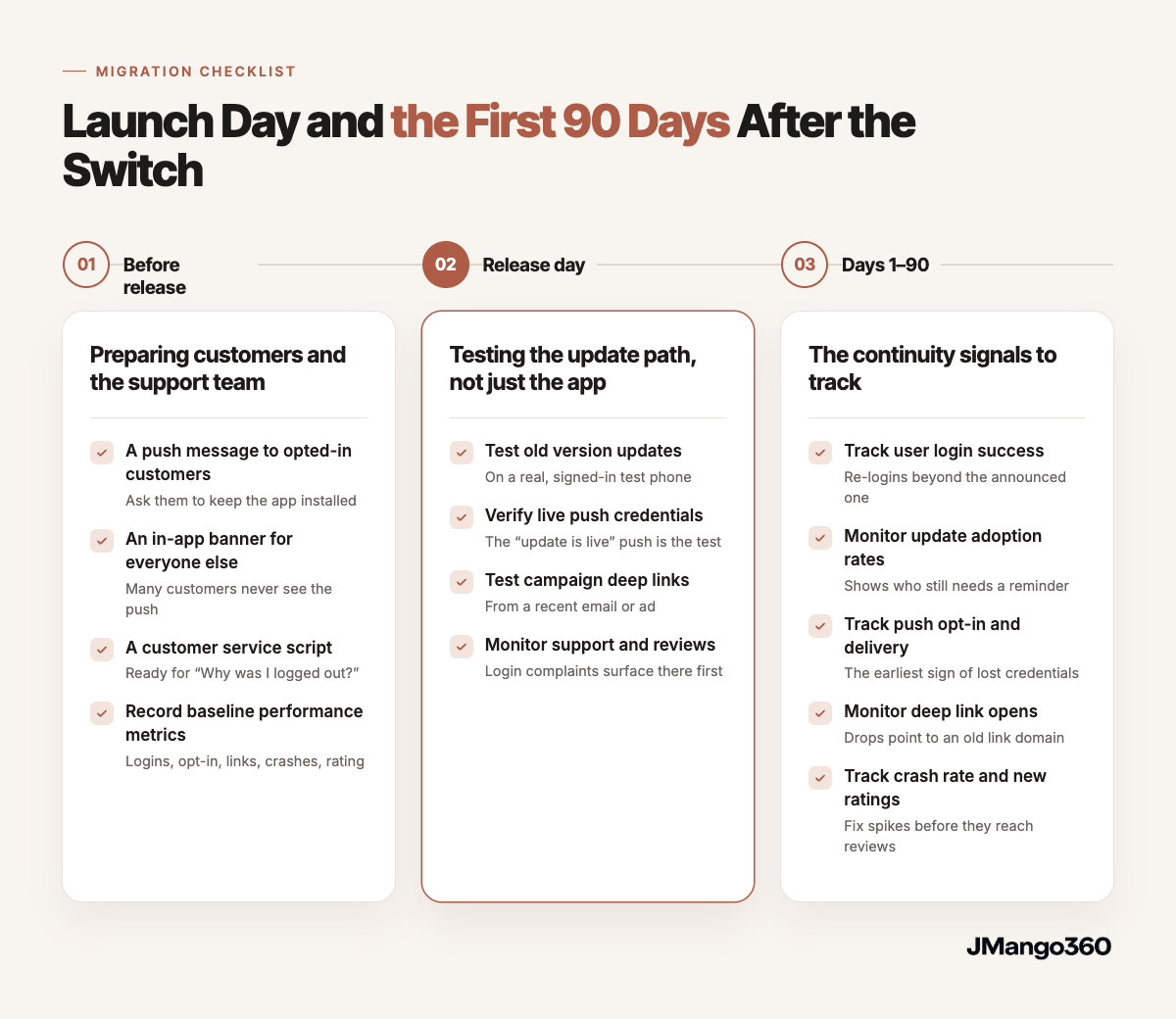
Once the update is approved, continuity depends on three moments: what customers hear before the update, what the team checks on release day, and which signals it tracks for 90 days afterward. Each moment has its own short, practical checklist below.
Before release: preparing customers and the support team
Customers who think an app is being discontinued delete it, along with their push permission, so the message has to arrive before the update does.
- A push message to opted-in customers. It says a new version is coming, asks customers to keep the app and, if a re-login applies, warns them once. "Our new app is on its way. Keep it installed; your account comes with you" sets the right expectation.
- An in-app banner for everyone else. With median iOS opt-in below 50%, many customers never see the push.
- A customer service script. "Why was I logged out?" and "Is the app being replaced?" arrive first; a prepared answer keeps them out of reviews.
- A baseline. Login success, push opt-in, deep-link opens, crash rate and the current rating, recorded before the switch, anchor every later comparison.
Release day: testing the update path, not just the app
Most pre-launch testing covers fresh installs, yet existing customers arrive by updating over the old version, so that path deserves its own check on a real device.
- Updating over the old version. A test phone running the current store version, signed in and opted in to push, should move to the new build without a reinstall, with any sign-in prompt matching what customers were told.
- A live push as a credentials test. The "update is live" message doubles as proof: if it reaches the test phone, the push credentials moved correctly.
- Deep links from real campaigns. A link from a recent email or ad should open the product page inside the app, not an error page or the home screen.
- Support inbox and new reviews. Login complaints and one-star reviews surface there first, while there's time to respond.
Days 1–90: the continuity signals to track
After release, the question shifts from whether the app launched to whether it kept its users. Five signals, compared with the baseline, answer it.
- Login success. Re-logins beyond the announced one point to a session or account-mapping problem.
- Update adoption. The share of active users on the new version shows who still needs a reminder.
- Push opt-in and delivery. A drop against the baseline is the earliest sign that credentials didn't carry over.
- Deep-link opens. Links that suddenly stop converting usually point to an old link domain or an unmigrated campaign.
- Crash rate and new ratings. The first releases set the rating's tone, so a crash spike is worth fixing before it reaches reviews.
These checkpoints are what JMango360's published methodology for how JMango360 runs app launches is built around: a launch plan with a readiness checklist and first push campaigns scheduled before go-live, then weekly calls throughout the first four months, a 90-day assessment and a dedicated success manager.
Frequently asked questions
Do our App Store reviews and rating survive a provider change?
Yes, as long as the app is updated or transferred rather than republished as a new listing. Apple's documentation states that a transferred app keeps its reviews and ratings, and Google Play moves ratings and reviews with the store listing when an app changes developer accounts. The rating can still move after the switch, because customers judge the new version on its first releases. That is why the first weeks after launch deserve close monitoring and a plan for responding to reviews.
Can we keep our app analytics history when we switch?
Partly. After an Apple transfer, the new account owner can see the app's App Analytics history, but sales and payment reports only cover transactions from the transfer date onward. Google Play doesn't transfer bulk export, payout or earnings reports, so downloading them beforehand is the safer route. Firebase and Google Analytics also need to be relinked to the new account. Keeping before-and-after numbers comparable requires its own event-mapping plan.
Do deep links break after an app migration?
They break if they depend on Firebase Dynamic Links or on a domain the previous provider controls. Firebase Dynamic Links shut down on August 25, 2025, and its links now return a 404 error, so any app still relying on them already has broken campaign links. Universal Links on iOS and App Links on Android, hosted on a domain the brand owns, keep working through a migration because the verification lives with the brand rather than with the provider.
What if our current provider owns the developer accounts?
Then the app has to be transferred to accounts the brand controls before the new partner can publish an update. On Apple, the current Account Holder initiates the transfer and the recipient accepts it. On Google Play, both accounts must be registered and active, and Google's support team reviews the request. Because the process needs the previous provider's cooperation, the transfer is best agreed as part of the exit plan, before the new contract is signed.
Will the app go offline during the switch?
Not when the migration is sequenced around an update. The old version keeps working on customers' phones until the new version is approved and released, and the update then replaces it under the same listing. Offline windows mostly appear when the commerce backend changes at the same time and the old app can no longer connect to it. In that case, aligning the website and app go-live dates is what keeps the gap short or removes it.
Ecommerce App Migration Without Losing Users Is an Ownership Project
Customers aren't lost in a migration because of new code. They're lost when the new app can't ship as an update to their listing, or when the credentials behind logins, push and links stay with the old team. The stores carry installs and ratings across when identifiers stay the same; everything else moves only when someone owns moving it.
Before comparing features, then, the deciding question is who owns each asset today. A partner who can't publish under your existing listing can't promise continuity. JMango360 is a specialist ecommerce mobile app partner, with 500+ apps launched: it brings proven expertise to build, launch and grow native iOS and Android shopping apps for established ecommerce brands, across any commerce stack, without requiring them to build that capability in-house.
- Confirming who holds the Apple Developer and Google Play accounts: this decides whether customers get an update or a new download.
- Listing every identifier, key and service tied to the app: unowned items break quietly.
- Searching campaigns for Firebase Dynamic Links: they have returned errors since August 25, 2025.
- Running the launch-day checklist above: a baseline, early customer messages and an update-path test are what prove the migration kept your users.
If you're weighing a provider change and want a second opinion on what your current setup would carry over, Talk to an expert. It's a conversation with a JMango360 specialist about your app and your commerce stack.