At a glance
- An ecommerce app health check scores a native shopping app on 12 signals across three layers: stability and speed, commerce integrity, and ownership after launch.
- Google Play's own rules show why this matters commercially: when crashes affect more than 1.09% of daily users, Google may reduce the app's visibility in the store.
- Most apps do not decline through one bad release; they slip where the app meets the web store and where nobody owns it after launch.
- A score out of 24 turns scattered complaints into a business risk leadership can act on.
The app looks fine on the dashboard, yet customers mention slow screens, push messages that never arrived and prices that do not match the website. An ecommerce app health check is the structured way to find out why: a review of your native shopping app, not your web store, scored on 12 signals you can check in about 30 minutes with data your team already has. Crashes are the easiest problem to see, but the signals that predict real trouble sit deeper, where the app depends on your commerce stack and on someone owning it after launch. What follows covers the three layers, how to score them and how to read the result.
What an ecommerce app health check covers
A store audit and an app health check answer different questions, because a native app fails in different places than a website. An ecommerce app health check treats the app as its own product: how stable and fast it is on iOS and Android, whether it matches your web store on prices, stock and accounts, and whether anyone owns it once it is live.
The difference is dependencies: a shopping app answers to Apple and Google, which change their rules every year, and to the APIs (the connections that pass prices, stock, accounts and orders between systems) it shares with Magento, BigCommerce or Shopify. A website release can break the app's checkout without the web team noticing, which is why many ecommerce app performance problems surface first as customer complaints.
Tolerance for those problems is low. In Luciq's 2026 survey of more than 1,000 US app users, 15.4% said they uninstall an app after a single crash, and 53.2% had abandoned a purchase during a major sale because an app crashed or slowed down. Subdued, a JMango360 client, is an Italian fashion brand for teenagers with 130 stores, and 75% of its customers browse and shop via mobile. JMango360 built the app and advised on its promotion, and 50% of online revenue ran through the app during Black Friday. At that share, an unnoticed crash on peak weekend is a lost trading day.
Three layers, twelve signals
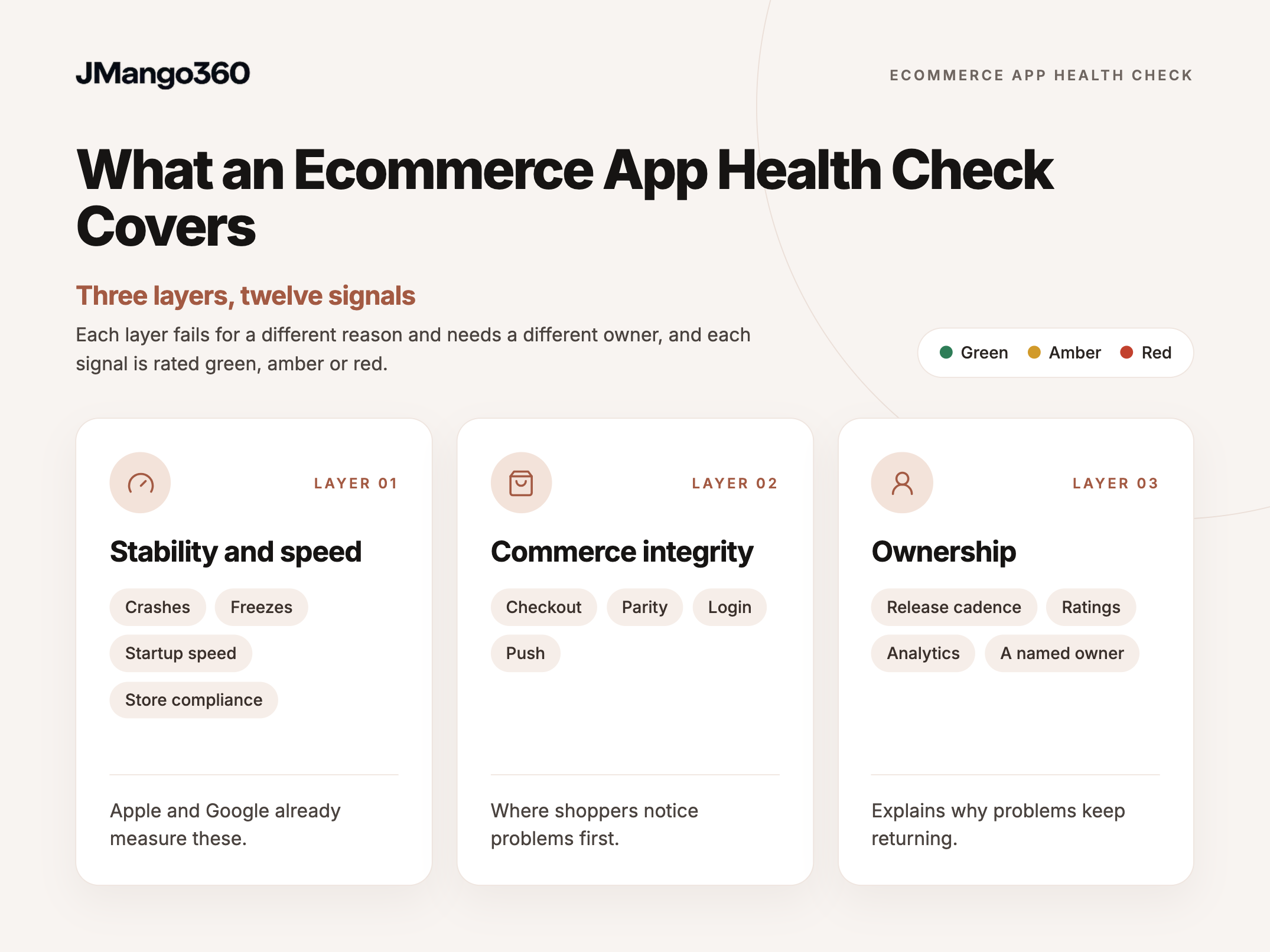
Each layer fails for a different reason and needs a different owner, and each signal is rated green, amber or red.
[IMAGE: hc-02-three-layers.png | alt text: Three layers of an ecommerce app health check: stability and speed, commerce integrity and ownership]
- Stability and speed covers crashes, freezes, startup speed and store compliance, which Apple and Google already measure.
- Commerce integrity covers checkout, parity, login and push, where shoppers notice problems first.
- Ownership covers release cadence, ratings, analytics and a named owner, which explains why problems keep returning.
Stability and speed: four signals the platforms already track
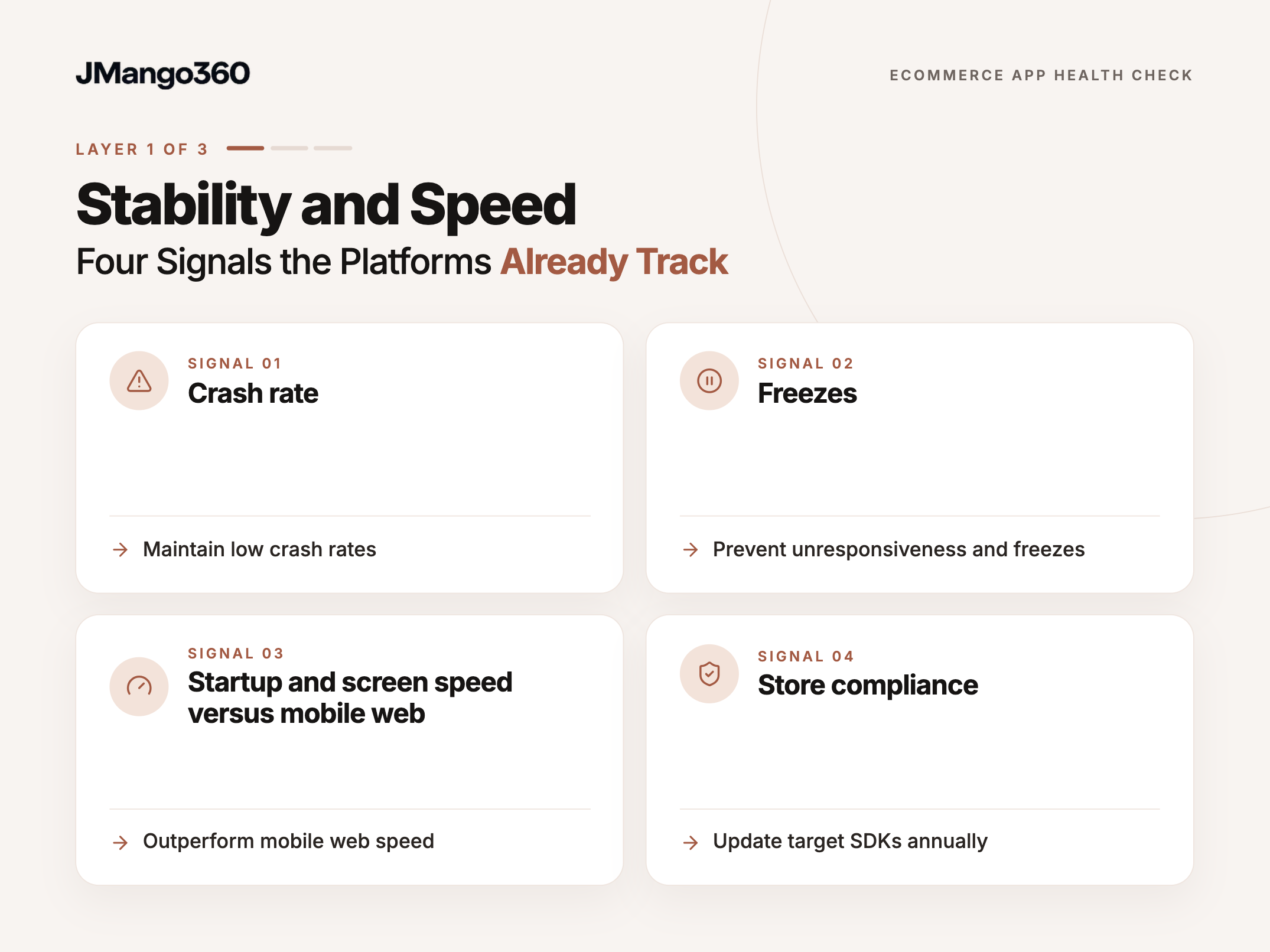
The first layer is the easiest to measure, because Apple and Google already track it for you. Crash rate, freezes, startup time and yearly compliance show whether the app is technically fit for customers, and each has a published standard.
Signal 1: Crash rate
Crash rate is the most visible signal, and Google publishes the line it holds apps to. According to Google's Android vitals documentation, Play may reduce an app's visibility or add a store-listing warning when user-perceived crashes exceed 1.09% of daily users, or 8% on any single phone model.
Crash tools often count per session rather than per daily user, so their numbers differ. For session-based tools, Luciq's Mobile App Stability Outlook 2025 found a median crash-free session rate of 99.95%, with around 99.85% linked to ratings above 4.5 stars. Green sits below Google's line; amber means a device model is flagged; red means the app is over it.
Signal 2: Freezes
Freezes hurt shoppers as much as crashes, yet rarely appear in crash reports because the app never closes. Android calls them ANRs (Application Not Responding): moments when the app stops reacting to taps for several seconds.
Google sets the ANR threshold at 0.47% of daily users, with the same 8% per-device line. Freezes matter because they cluster on heavy screens such as search and checkout, and scoring mirrors crash rate.
Signal 3: Startup and screen speed versus mobile web
A native app should open and browse faster than your mobile site, so a slower app is a warning sign. The cause usually sits in how it loads data: too many data requests to the store per screen or heavy product images.
Google's startup guidance treats a cold start (opening the app when it is not already running in the background) of 5 seconds or more as excessive. A useful test is to time three journeys on the app and the mobile site: home to product, search to results, and cart to payment. Faster on all three is green, slower on one is amber, and flagged slow starts are red.
Signal 4: Store compliance
An app that falls behind Apple's or Google's yearly requirements cannot ship updates, which turns every other fix into a waiting game. Both platforms raise the bar every year.
As of October 2026, Apple's upcoming requirements page states that since 28 April 2026, uploads must be built with Xcode 26 (Apple's app-building software) and the iOS 26 SDK (software development kit: the tools and code libraries an app is built with). Google Play Console Help requires new apps and updates to target the latest Android version (Android 16) from 31 August 2026. Green means compliant with next year planned; amber means compliant with no plan; red means the team could not ship an update today.
Commerce integrity: four signals where app meets store
The second layer is the one most health checks skip, and the one shoppers notice first, because it touches money, stock and accounts. Commerce integrity measures whether the app faithfully mirrors your store across checkout, prices, stock, customer accounts and push.
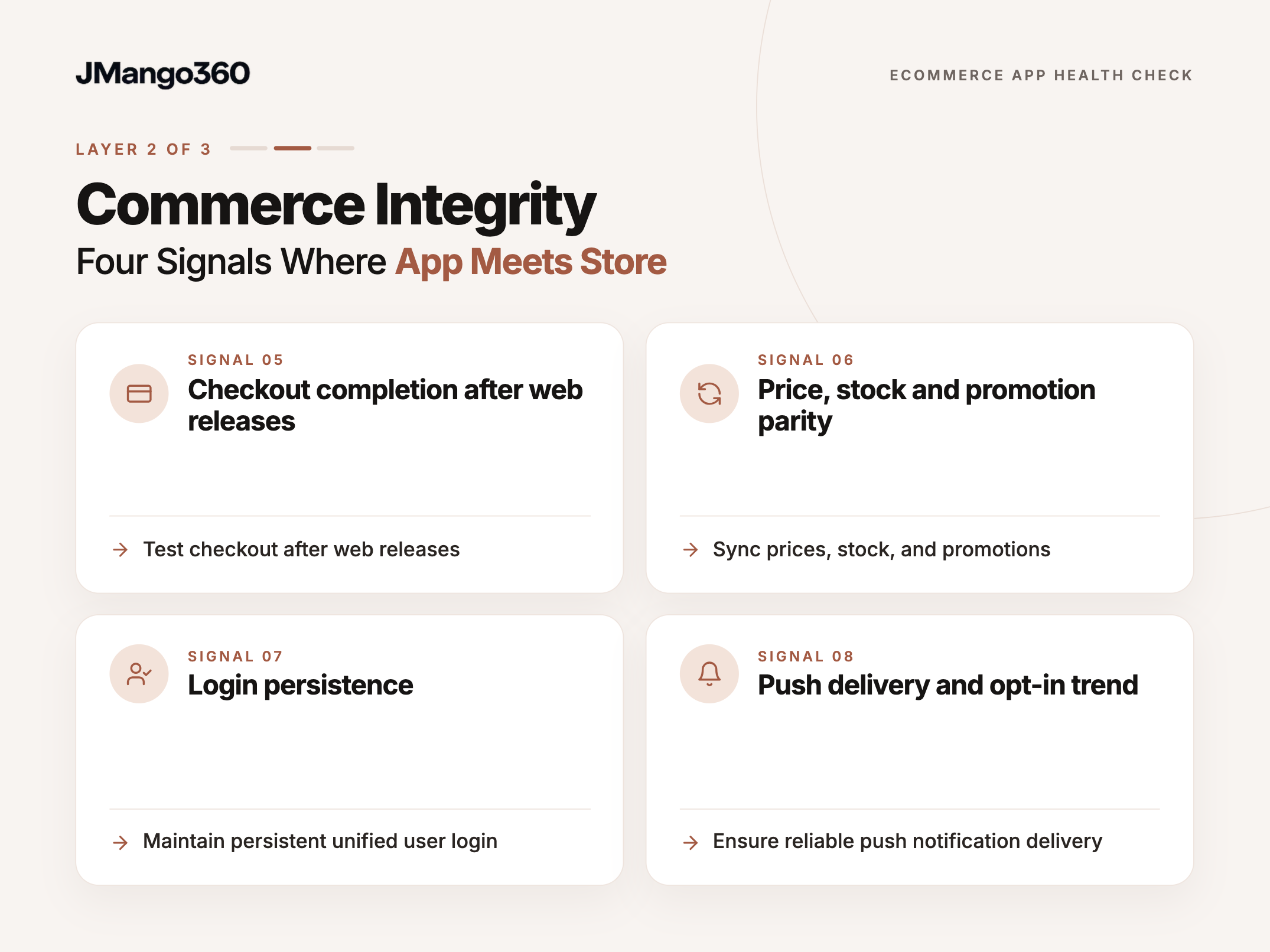
Signal 5: Checkout completion after web releases
Checkout is where every other signal pays off or fails, and it is often the first thing a website release breaks. The app and website usually share commerce APIs, so a shipping rule or payment step built for the web can change a response the app depends on.
A practical test is a real order on iOS and Android after every web or platform release. A checkout failure stops revenue on the channel loyal customers use most. Passing after every release is green, occasional testing is amber, and no testing or a failed order is red.
Signal 6: Price, stock and promotion parity
When the app shows a price, stock level or promotion the website does not, shoppers stop trusting both. Mismatches usually come from the app keeping its own copy of catalogue data, current only as of the last sync.
PassaSports, a JMango360 client specialising in nine sports, saw customers shopping across sport-specific shops, each with its own checkout. Nine shops were merged into one app with a single checkout; it started with two sports, and all labels were integrated within a few months. Its CMS integration makes category and product updates appear instantly, so parity is designed in rather than patched. A useful test is comparing 10 SKUs and one live promo code: all matching is green, one or two gaps amber, more is red.
Signal 7: Login persistence
Customers expect to stay logged in, with one account across app and website. Forced logins or separate accounts put saved addresses and loyalty balances out of reach, which suppresses repeat purchases.
At PassaSports, customers log in with their existing account on both the webshop and the app. Login failures rarely show in technical dashboards; they appear in service tickets and reviews. One shared account with no complaints is green, occasional logouts after updates amber, and separate accounts or recurring complaints red.
Signal 8: Push delivery and opt-in trend
When push notifications stop working, the quickest diagnosis starts with delivery rather than content. Push depends on Apple's and Google's services and on providers such as OneSignal, so expired credentials or outdated SDKs can silently stop messages.
Vlisco, a JMango360 client designing printed wax fabrics since 1846, wanted to reach its fan base directly. JMango360 built a native app with deep out-of-the-box integrations with Magento 2 and GA4, and three months after launch Vlisco reported push opt-in of about 50%. That is one brand's result, not a benchmark, but it shows what a silent push failure risks. Confirmed delivery with stable opt-in is green, falling opt-in amber, and unconfirmed delivery red.
Ownership: four signals of who runs the app
The first two layers show what is wrong; this layer shows why it keeps happening. Most ecommerce apps that fail after launch were not built badly. They fail because nobody clearly owns OS updates, compliance, integrations and the roadmap once the launch project ends.
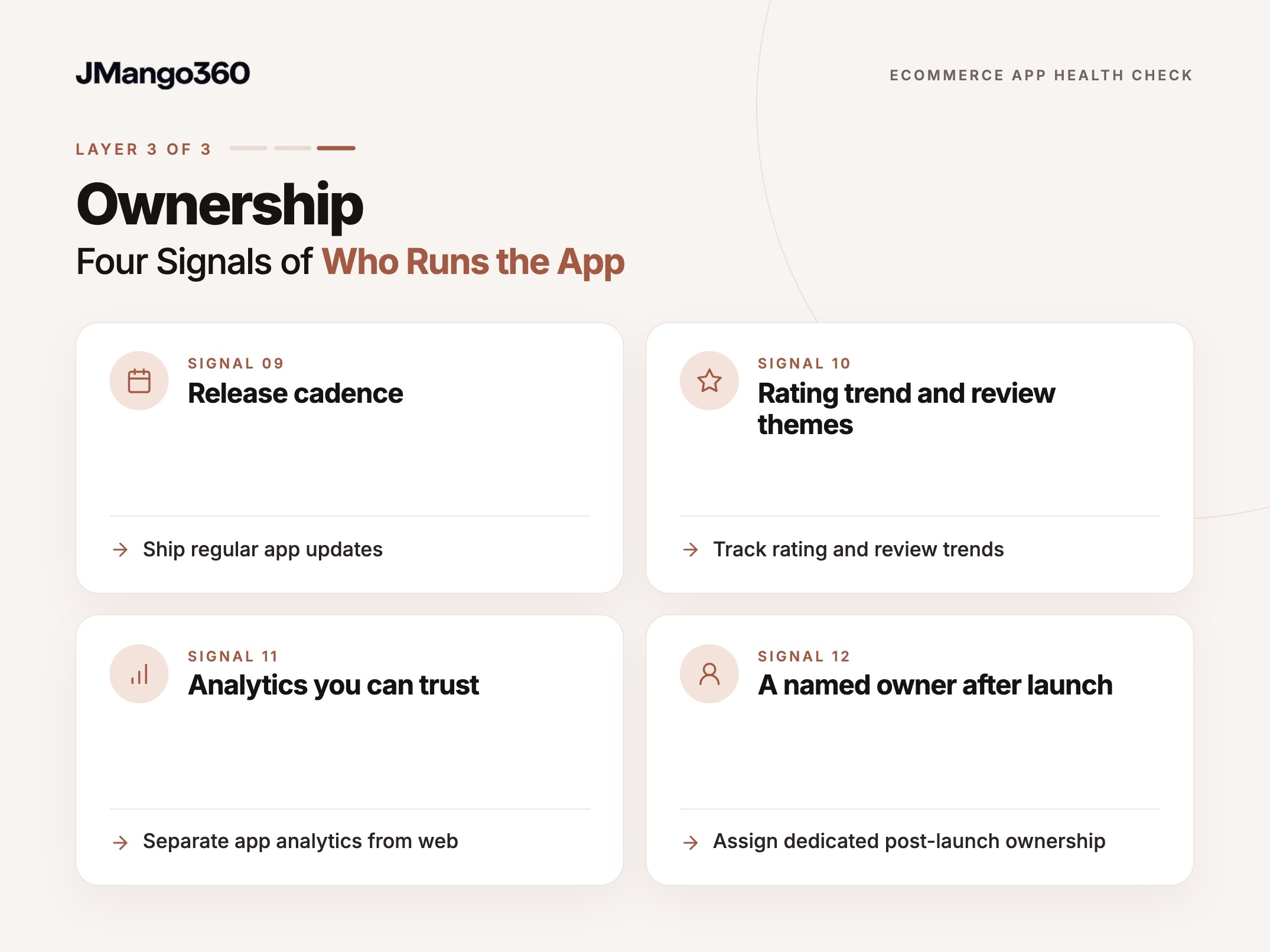
Signal 9: Release cadence
How recently the app shipped an update is a simple proxy for whether anyone is looking after it. Releases are how fixes reach customers.
Users notice: in Luciq's 2026 survey, regular updates (57%) were the top reason respondents stayed loyal to an app despite occasional bugs. As a working rule, a release in the last 90 days with the next one planned is green, three to six months amber, and longer red.
Signal 10: Rating trend and review themes
The rating's direction says more than its average, and recent review themes say more than either. Shoppers often review a failed checkout before any dashboard flags it.
For reference, Vlisco holds a 4.9 app store rating and Subdued a 4.5-star average app rating, showing ratings can stay high when an app is actively looked after. A stable or rising rating is green, recurring commerce complaints amber, and a falling rating red.
Signal 11: Analytics you can trust
If app revenue and conversion cannot be seen separately from the website, nobody can tell whether the app is improving. Every decision about it then becomes opinion.
The baseline is app orders and revenue appearing as their own channel in GA4 and matching the commerce platform, as Vlisco's Magento 2 and GA4 integration allows. A trusted split is green, an untrusted one amber, and no split red.
Signal 12: A named owner after launch
The last signal explains most of the others: whether one person or partner is accountable after go-live. Apps decay between teams, with IT owning the website, marketing owning push and nobody owning the app.
Clear ownership covers OS updates, compliance, integration changes and the roadmap. As one published example, JMango360 sets out how JMango360 builds, launches and grows ecommerce apps: weekly calls throughout the first four months, a 90-day assessment, a dedicated success manager, and a monthly fee covering iOS and Android updates and app store compliance. All four areas owned is green, some amber, and nobody able to name the next platform deadline red.
Scoring the 12 signals in 30 minutes
A score only helps if it is quick to produce and easy to repeat. Green earns 2 points, amber 1 and red 0, for a maximum of 24 that falls into one of three bands.
Play Console, App Store Connect, your crash tool, the review pages, your push dashboard and GA4 cover most signals; test orders and a 10-SKU comparison cover the rest. A few, such as the Android version the app targets and its push credentials, need developer or partner access, and if nobody can confirm them within a day, that answers Signal 12.
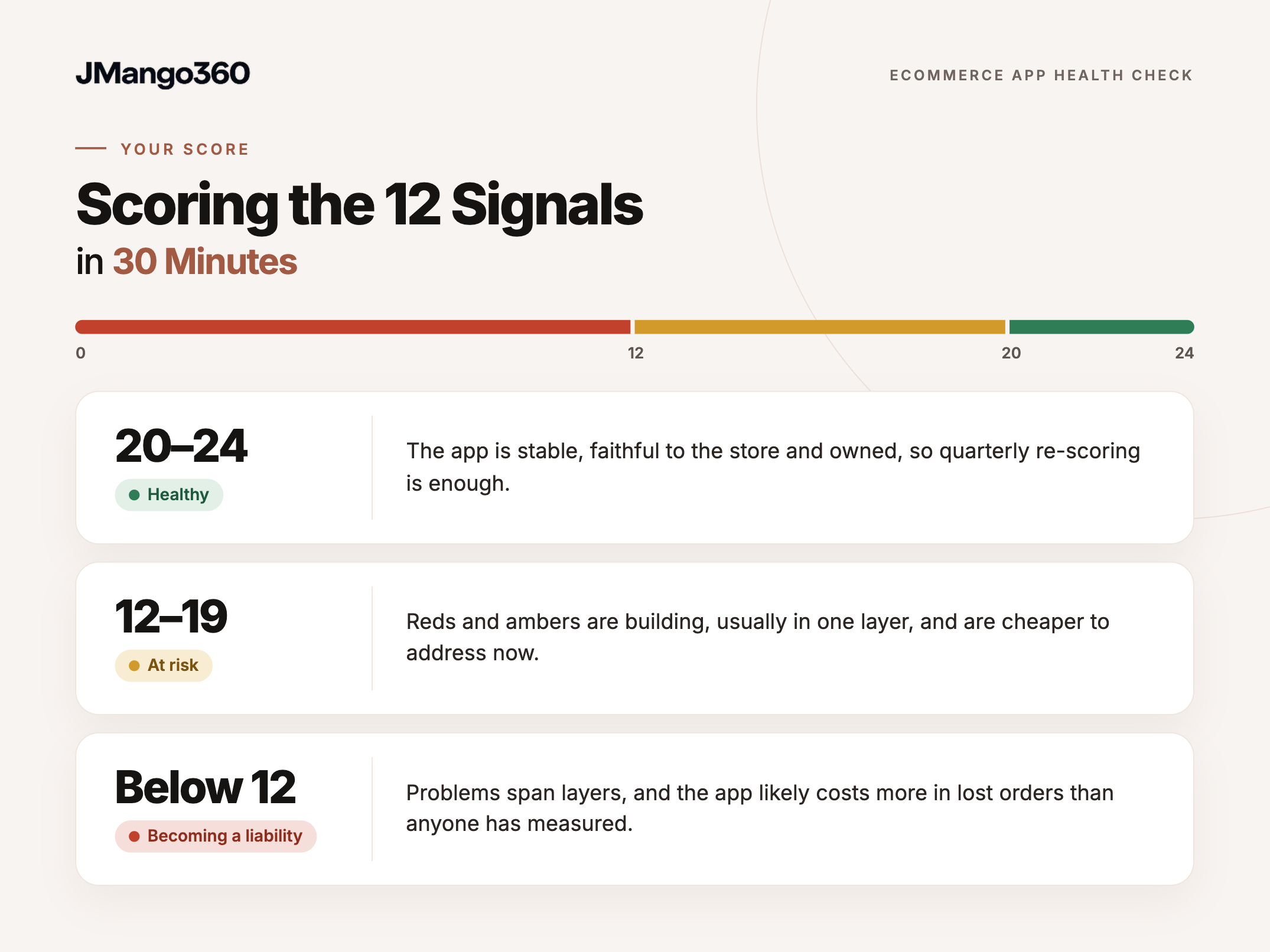
- 20–24: healthy. The app is stable, faithful to the store and owned, so quarterly re-scoring is enough.
- 12–19: at risk. Reds and ambers are building, usually in one layer, and are cheaper to address now.
- Below 12: becoming a liability. Problems span layers, and the app likely costs more in lost orders than anyone has measured.
Technical or ownership problem? What a low score means
A low score has two possible causes, and the right response depends on which one you face. The pattern of reds across the three layers usually reveals the cause, and that diagnosis is worth making before anyone starts fixing anything.
When it is a technical problem
A technical problem is contained: reds cluster in one layer, someone owns the app and fixes hold. It calls for a targeted fix rather than a change in how the app is run.
A crash spike on one Android model after an SDK update is a typical case, and the work is prioritising reds by revenue impact.
In short
- Typical pattern: Reds concentrate in one layer while ownership signals stay green.
- Root cause: A specific defect, update or integration change.
- Who should act: The existing app owner or partner.
- First move: Fixing the reds that touch checkout and stability.
- Watch for: The same signal turning red again after the next web release.
When it is an ownership problem
An ownership problem is spread out: reds appear across layers, issues return after every web release or OS update, and nobody knows the next platform deadline.
Fixing individual reds helps only briefly. The useful response is settling ownership first, in-house or with a partner, before spending on fixes.
In short
- Typical pattern: Reds and ambers across all three layers.
- Root cause: No one is accountable for the app after launch.
- Who should act: Leadership, by assigning ownership.
- First move: Naming the owner and the next platform deadline.
- Watch for: Fixes that hold for a month, then unravel.
Frequently asked questions
What crash rate is acceptable for an ecommerce app?
Google Play uses 1.09% of daily users experiencing a crash as its overall bad-behaviour threshold, and 8% on any single phone model; above those lines, Play may reduce the app's visibility. Session-based tools measure differently: Luciq's 2025 stability report found a median of 99.95% crash-free sessions across apps on its platform. Because the two count in different ways, it is safer to track each figure against its own standard than to compare them directly.
How often should we run an ecommerce app health check?
Quarterly is a sensible rhythm for most brands, with an extra check after any major website or platform release and before peak season. The commerce layer changes whenever the web store changes, and Apple and Google update their requirements every year, so a yearly review can miss months of silent problems. Repeating the same 12 signals also makes the score comparable over time, which is what turns it into a management tool.
What happens if our app misses Apple's or Google's requirements?
The immediate effect is that new updates cannot be submitted. Since 28 April 2026, Apple only accepts uploads built with its latest developer tools (Xcode 26 and the iOS 26 SDK), and from 31 August 2026, Google Play requires updates to target the latest Android version (Android 16). Existing Android apps that target below Android 15 also become unavailable to new users on newer devices. Customers who already installed the app can keep using it, but fixes and new features stall until the build catches up.
Can our ecommerce team run the health check without developers?
Mostly, yes. Unlike a full ecommerce app audit carried out by developers, this check relies on data an ecommerce or product manager can usually reach: crash and freeze rates, ratings and reviews, push results, GA4 and test orders. A few signals, such as the Android version the app targets, SDK versions and push credentials, need confirmation from a developer or the app partner. If those answers take more than a day to get, that delay is itself a useful finding about ownership.
Does a low score mean our ecommerce app needs rebuilding?
Not necessarily. A low score shows where the app is failing and whether the cause is technical or ownership, not which remedy to choose. Many signs your ecommerce app needs rebuilding, such as recurring crashes or integrations that keep breaking, can also come from an app nobody maintains. Settling ownership and fixing the reds first shows whether the problems are structural, and that evidence makes any later decision about fixing or replacing the app far easier to justify.
Turning an ecommerce app health check into a habit
An ecommerce app health check is less about finding one broken thing than about seeing where the app is drifting. Crashes are the visible part. The signals that predict lasting damage sit in the commerce and ownership layers: whether the app still mirrors your store, and whether anyone owns it now that the launch project is over.
That distinction shapes the decision ahead. One technical red calls for a targeted fix. Red ownership signals call for an ownership decision before spending on fixes. A score below 12 belongs on the leadership agenda, because the app is likely already costing orders nobody has counted.
- Pulling the last 28 days of Android vitals and iOS crash data. The platforms already measure it, so this takes minutes.
- Placing test orders on iOS and Android after the next web release. It catches the most common silent failure at the point where revenue is lost.
- Comparing 10 SKUs and one promo code between app and website. Shoppers see parity gaps long before reports do.
- Checking push credentials and the opt-in trend. A broken push channel stays silent until its revenue drops.
- Writing down the app's named owner and next platform deadline. If either is missing, the score has found its root cause.
- Sharing the score with leadership. A number out of 24 turns an IT ticket into a business decision.
JMango360 is a specialist ecommerce mobile app partner with 500+ apps launched. It brings proven expertise to build, launch and grow native iOS and Android shopping apps for established ecommerce brands, across any commerce stack, without requiring them to build that capability in-house. If your score raises questions about what to fix first or who should own the app, Talk to an expert offers a conversation with a JMango360 specialist about your app and commerce stack.
Which of the 12 signals would your app fail first?